
An MVP app — short for Minimum Viable Product app — is a streamlined version of your application that contains only core features necessary to solve a user’s main problem. The goal is to validate your idea, gather real user feedback, and save time and resources before building a full-featured product.
By learning how to build an MVP app in 60 days, startups in Mumbai, Bangalore, Chennai, and Silicon Valley can quickly test ideas, attract early adopters, and adjust development based on real-world feedback.
This guide walks you through the entire Minimum Viable Product app journey, from pre-planning to launch, including cost insights, tech stack choices, geo-specific strategies, and timeline planning.
Minimum Viable Product App Fundamentals
What Is an MVP App?
Short Answer (Snippet-Friendly):
- An MVP app is a minimum viable product version of your application containing only the features needed to solve the core user problem.
- It allows early testing, validation, and cost-efficient development.
Details:
The MVP approach follows the Lean Startup methodology. It reduces the risk of building a product nobody wants while helping teams prioritize user-centric development. (Source: Wikipedia – Minimum Viable Product)
Why Build an MVP First
- Launch faster with essential features only
- Test assumptions and validate ideas
- Gather real user feedback for iterations
- Reduce initial development costs
- Attract early adopters and potential investors
Day 1–10: Pre-Planning – Define Vision & Audience
Key Tasks:
- Define the core problem your app solves
- Identify early adopters and target audience
- Outline success metrics: retention rate, engagement, or conversion
Snippet-Friendly Bullets:
- Create a problem statement: “Our app helps freelancers manage invoices in under 5 minutes.”
- Conduct competitor research: see what works and gaps in the market
- Validate idea with surveys, focus groups, or landing pages
Tip: Align pre-planning with city-specific startup ecosystems (Mumbai fintech, Bangalore AI/tech startups, Chennai IT outsourcing).
Day 11–20: Core Minimum Viable Product App Features
Focus on must-have functionality only:
Feature Prioritization Table:
| Feature | Priority | Purpose |
| User Login | Must-have | Personalization & data tracking |
| Core Workflow | Must-have | Solves primary problem |
| Push Notifications | Should-have | Engagement & reminders |
| Social Sharing | Nice-to-have | Optional, post-launch |
Short Bullet Summary:
- Must-have: essential functionality to solve the main problem
- Should-have: improves user experience but not critical
- Nice-to-have: add only after launch
MVP App Examples:
- Dropbox (file sharing)
- Airbnb (booking core concept)
- Simple budgeting apps
Day 21–30: Design & Prototyping
Snippet-Friendly Bullet Tips:
- Wireframes: map screens and flow
- Low-fidelity UI: focus on usability over aesthetics
- User journey mapping: ensure easy navigation
Recommended Tools:
- Figma, Adobe XD, Sketch, Balsamiq
Design Principles:
- Keep interface minimal
- Clear CTA buttons for each screen
- Include feedback collection points
Day 31–45: Development Approach & Tech Stack
Choose Development Method:
- Custom Code: scalable and flexible
- No-Code/Low-Code MVP App Builder: fast prototyping (Bubble, Glide)
- Cross-Platform Frameworks: Flutter, React Native for Android & iOS
Minimum Viable Product App Architecture Table:
| Architecture | Use Case | Benefits |
| MVC | Simple apps | Separation of concerns |
| MVP | Modular apps | Easier testing & updates |
| MVVM | UI-driven | Reactive programming |
Tech Stack Example:
- Frontend: React Native / Flutter
- Backend: Node.js / Django
- Database: PostgreSQL / MongoDB
- API: REST / GraphQL
Explore:
Day 46–50: Testing & Quality Assurance
Snippet-Friendly Bullets:
- Unit Testing: verify individual features
- Integration Testing: ensure features work together
- UI Testing: check navigation & responsiveness
- Beta Testing: real users provide feedback
Tip: Use bug-tracking tools like Jira or Trello. Early testing reduces post-launch errors.
Day 51–60: Launch Strategy & Feedback Loop
Short Bullet Summary:
- Soft Launch: limited user base (e.g., early adopters)
- Collect Feedback: surveys, analytics, in-app feedback
- Measure Metrics: engagement, retention, usage patterns
- Iterate: plan next features based on insights
Tools: TestFlight (iOS), Google Play Beta (Android), Mixpanel, Google Analytics
Post-Launch: Iterate & Scale
- Add high-value features incrementally
- Improve performance and UX
- Plan for v2 or full-feature release
Explore:
Cost, Hiring & Outsourcing Considerations
- MVP App Cost: $5k–$50k (based on features and location)
- Outsourcing Benefits: India offers affordable development without compromising quality
Relevant Links:
Geo-Targeting: Regional Insights
India:
- Bangalore: tech startups, AI innovation
- Mumbai: fintech & enterprise mobility
- Chennai: IT outsourcing & support for Minimum Viable Product apps
USA:
- Silicon Valley: early adopters & funding
- NYC: fintech & SaaS MVPs
- Austin: tech-friendly ecosystem
Tip: Local language support (Hindi, regional languages) can improve adoption in India.
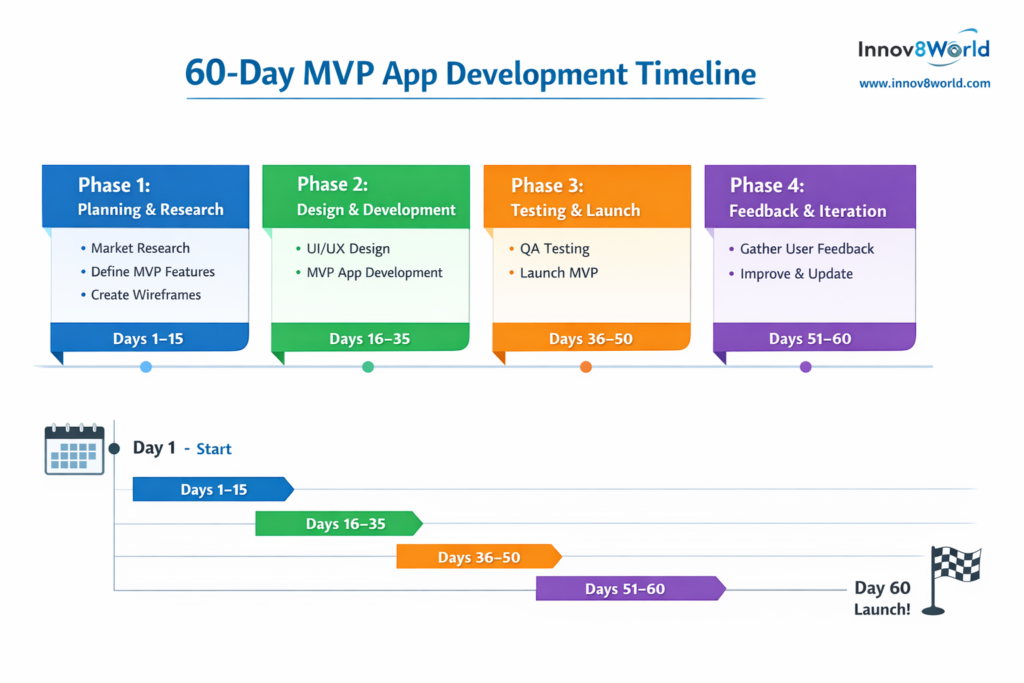
60-Day Minimum Viable Product App Timeline
Phase Days Key Activities
———————————————————–
Pre-Planning 1–10 Define problem, research
Feature Selection 11–20 Must-have features only
Design/Prototyping 21–30 Wireframes, UI, UX mapping
Development 31–45 Build MVP using tech stack
Testing & QA 46–50 Unit, integration, beta testing
Launch & Feedback 51–60 Soft launch, analytics, feedback
Iterate & Scale Post 60 Plan v2 and full-feature app
Emerging MVP App Trends
- AI MVP Apps: recommendation engines, smart automation
- No-Code MVP Apps: rapid prototyping for startups
- Flutter MVP Apps: cross-platform efficiency, faster launch
Explore:
FAQ – MVP App
- 1. What is an MVP app in simple terms?
- An MVP app is a Minimum Viable Product version of your application containing only essential features that validate your idea and solve the core user problem quickly. It helps startups reduce risk and cost while gathering real feedback. (Source: Wikipedia)
- 2. How long does it take to build an MVP app?
- You can build a viable MVP app within 30–60 days if you focus on core features, use agile iterations, and avoid over‑engineering. The exact timeline depends on complexity and team capability.
- 3. What should be included in an MVP app?
- Only the functionality that directly solves your user’s main problem. Avoid “nice‑to‑have” features until after launch and user validation.
- 4. How much does MVP app development cost?
- Cost varies by team location, complexity, and tech stack. Outsourcing to regions like India can reduce development cost while maintaining quality.
- 5. What are some MVP app examples?
- Examples include early versions of Dropbox, Airbnb, and simple tools like budgeting or scheduling apps that test market demand before full rollout.
Call-To-Action: Build Your MVP App Today
If you want to launch your MVP app in 60 days and validate your idea with real users, partner with Innov8world. We provide:
- Dedicated MVP app developers in India
- End-to-end MVP app development services
- Agile, cost-effective, and scalable solutions